
YourTour.com: Easy Trip Planning for Paris & France
· BootsnAll
 Although you'll hear over and over again (on the pages of this site as well as others) that you should try to avoid driving in Paris if you can, sometimes hopping in a car and getting out of the city for a day (or longer) is a great idea. Whether your vacation is entirely based in Paris and you're taking a bunch of day-trips, or you're spending time traveling throughout other parts of France after your stay in Paris, if you'd like a little help in planning your driving itinerary you'll be happy to hear about a new website called YourTour.
The idea behind YourTour is simple - by choosing a few things like regions you want to visit and what kinds of things you're interested in doing, the site will produce an itinerary for you that includes everything from museums and attractions along the route to hotels you might want to consider staying in. The site will generate an itinerary for you which you can then fine-tune as you like until you have the perfect trip.
What's interesting at the moment about YourTour is that it's only available for France right now. They're planning to add more countries later on, but for the time being those of you who are traveling to France will benefit from it being the site's test-country.
How it Works:
Although you'll hear over and over again (on the pages of this site as well as others) that you should try to avoid driving in Paris if you can, sometimes hopping in a car and getting out of the city for a day (or longer) is a great idea. Whether your vacation is entirely based in Paris and you're taking a bunch of day-trips, or you're spending time traveling throughout other parts of France after your stay in Paris, if you'd like a little help in planning your driving itinerary you'll be happy to hear about a new website called YourTour.
The idea behind YourTour is simple - by choosing a few things like regions you want to visit and what kinds of things you're interested in doing, the site will produce an itinerary for you that includes everything from museums and attractions along the route to hotels you might want to consider staying in. The site will generate an itinerary for you which you can then fine-tune as you like until you have the perfect trip.
What's interesting at the moment about YourTour is that it's only available for France right now. They're planning to add more countries later on, but for the time being those of you who are traveling to France will benefit from it being the site's test-country.
How it Works:
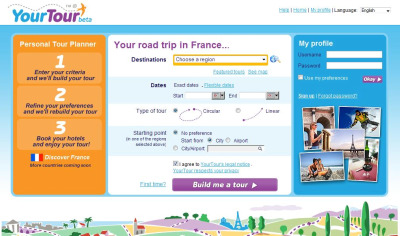
 You'll need to have a little familiarity with France before you start playing with the website, because the first thing you'll need to decide is what region(s) you want to visit. You can pick from a list or from a map of France, so even if you don't know what all the names of the regions are you can get a better idea of where you want to go by looking at the map. And if you're really stumped, you can click on the "Featured Tours" link underneath the destination list to see if any of YourTour's suggested itineraries is a good place to start, too.
After the region or regions you'll visit, you need to pick the dates of your trip - or you can select "Flexible Dates" and tell the system how many days you want your trip to be within a certain date range. Then you decide whether you want your route to be circular (starting and ending in the same place) or linear (ending in a different place entirely from where you started) and choose your starting point. Click "Build me a tour" and wait...
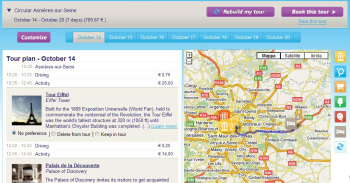
The tour is then presented to you, laid out by each day's detailed itinerary - including the cost of each thing on the itinerary (even an estimate of driving costs!). This is when you start personalizing your itinerary. Under each item, there are three options - No Preference, Delete From Tour, Keep in Tour - and you click one of those (the default is "No Preference") to tailor the trip to exactly how you'd like it to be. Each time you make changes based on the preferences, you can click "Rebuild my tour" at the bottom of the page and YourTour will fill in whatever gaps you've created based on deleting something from the tour.
You'll need to have a little familiarity with France before you start playing with the website, because the first thing you'll need to decide is what region(s) you want to visit. You can pick from a list or from a map of France, so even if you don't know what all the names of the regions are you can get a better idea of where you want to go by looking at the map. And if you're really stumped, you can click on the "Featured Tours" link underneath the destination list to see if any of YourTour's suggested itineraries is a good place to start, too.
After the region or regions you'll visit, you need to pick the dates of your trip - or you can select "Flexible Dates" and tell the system how many days you want your trip to be within a certain date range. Then you decide whether you want your route to be circular (starting and ending in the same place) or linear (ending in a different place entirely from where you started) and choose your starting point. Click "Build me a tour" and wait...
The tour is then presented to you, laid out by each day's detailed itinerary - including the cost of each thing on the itinerary (even an estimate of driving costs!). This is when you start personalizing your itinerary. Under each item, there are three options - No Preference, Delete From Tour, Keep in Tour - and you click one of those (the default is "No Preference") to tailor the trip to exactly how you'd like it to be. Each time you make changes based on the preferences, you can click "Rebuild my tour" at the bottom of the page and YourTour will fill in whatever gaps you've created based on deleting something from the tour.
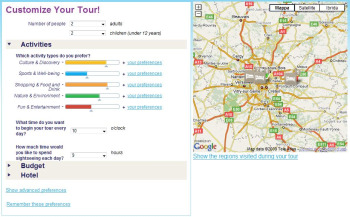 To help YourTour tailor your trip even more, click the "Customize" button at the top of the itinerary page and tell the system:
- how much you like things like culture, sports, shopping, and nature
- what time you want to start each day and how much time you want to devote to sightseeing
- what your overall budget is
- what kind of hotel you prefer
- how many people - including how many children under 12 - are going along for the trip